Multi-Homed Synced Agent Twins. Why Chatting With an AI on Your Phone Is Easy—and Why Syncing the Exact Same Agent Brain & Git Workspace Between Your Laptop and the Cloud Changes Everything.
Every major AI vendor (Claude Mobile, ChatGPT iOS, Cursor Background Agents) lets you open a chat window on your phone. That alone is not groundbreaking—until you realize that their mobile cloud chat is a completely separate, stateless session with zero access to the local project on your laptop, your uncompacted desktop conversation history, or your private production server mesh.
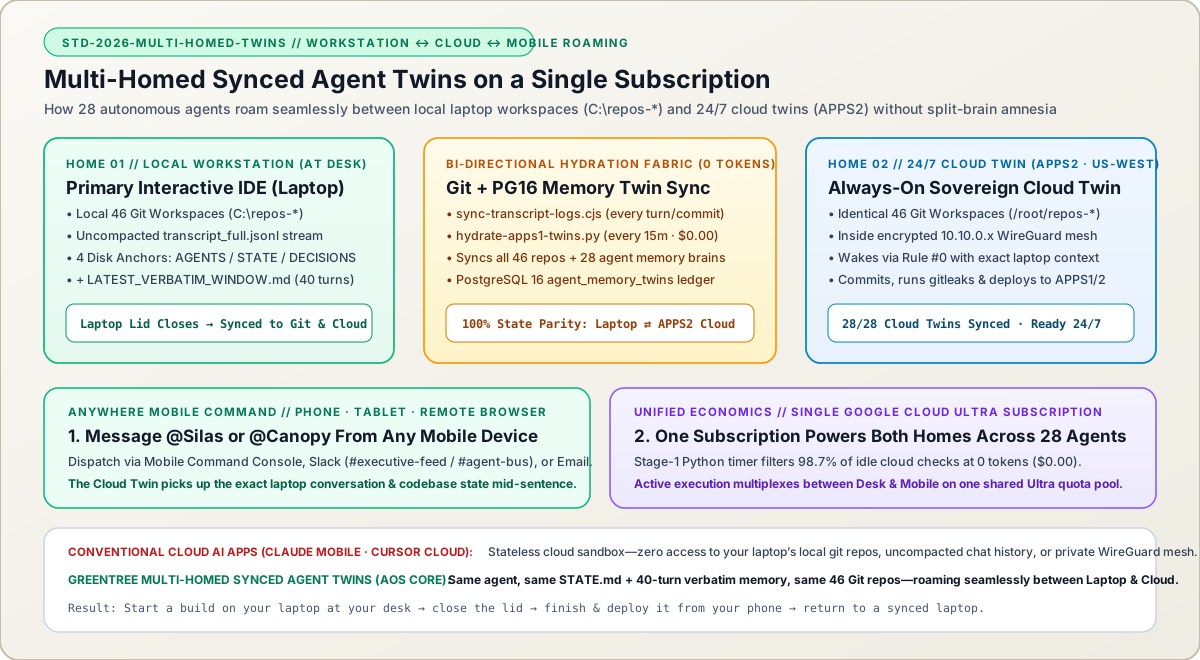
At GreenTree Hosting and AOS Core, every one of our 28 autonomous agents (@Silas, @Canopy, @Steward, @Kinetic, etc.) is Multi-Homed: each agent lives simultaneously on our primary workstation (C:\repos-*) and on our 24/7 West-Coast Cloud Node (APPS2 /root/repos-* + PostgreSQL 16 agent_memory_twins). Using continuous zero-token bi-directional hydration and a single Google Cloud / AI Ultra subscription, we can start a complex build on a laptop, close the lid, pick up the exact same conversation and codebase mid-sentence from a mobile phone anywhere in the world, and return to a fully synchronized laptop.
Why We Wrote This Playbook—And What It Means for Your Next Platform
Let’s start with an honest engineering distinction: talking to an AI from a mobile phone is not new. Anyone can install the Claude, ChatGPT, or Gemini mobile app, or open a browser-based cloud coding sandbox while away from their desk.
So why do conventional setups still trap serious engineering teams at their desks? Because in a standard setup, your local desktop agent and your mobile cloud chat have split-brain amnesia:
- If you spend four hours pair-programming with an AI agent on your laptop (
C:\repos-*), your uncommitted architectural context, your localtranscript_full.jsonlconversation stream, and your local scripts live on that laptop’s NVMe drive. The moment you close your laptop lid and walk out with your phone, that local agent is offline and unreachable. - If you then open a standard mobile AI app on your phone, you are talking to a fresh, isolated cloud container that cannot see your laptop’s active conversation window, cannot read the local
STATE.mdanchor you just updated, and cannot SSH across your private10.10.0.xWireGuard production mesh.
We solved that problem by engineering Multi-Homed Synced Agent Twins (STD-2026-MULTI-HOMED-TWINS). Instead of treating "local IDE agent" and "cloud agent" as two different products, every agent in our 28-agent workforce has two synchronized physical homes: Home 1 (Local Workstation Primary) for high-bandwidth desktop engineering, and Home 2 (Always-On Cloud Twin on APPS2) for 24/7 autonomous monitoring and mobile command. Because both homes continuously sync their 4 non-volatile memory anchors (AGENTS.md, STATE.md, DECISIONS.md, and LATEST_VERBATIM_WINDOW.md) and all 46 Git repositories every 15 minutes at zero token cost—and share a single Google Cloud / AI Ultra subscription—closing your laptop never interrupts your workforce.
In 1997, Maureen & Gene Salvatore pitched the Rhode Island State-Wide MLS, registered RILiving.com in June 1997, and launched one of the state’s earliest searchable database-driven real estate platforms in January 1998. Following senior roles in commercial hosting and physical data center operations in Boston and Connecticut, they founded GreenTree Hosting, LLC in 2007 to build custom web applications and managed Linux cloud infrastructure.
Why Standard Mobile AI Apps Suffer From "Split-Brain" Isolation: Standard cloud/mobile AI sessions spin up an isolated sandbox that has no access to the active conversation tab on your desktop IDE, your local filesystem state, or your internal WireGuard production servers.
True Multi-Homed Agent Identity (1 Agent, 2 Physical Homes): Every one of our 28 agents (@Silas, @Canopy, @Steward, etc.) is provisioned identically on the local workstation (C:\repos-) and on our US-West cloud node (APPS2 /root/repos- + PostgreSQL 16 agent_memory_twins).
Zero-Token Bi-Directional Hydration (hydrate-apps1-twins.py + sync-transcript-logs.cjs): Every turn on the workstation extracts the uncompacted verbatim conversation into LATEST_VERBATIM_WINDOW.md, while our 15-minute Python hydrator syncs all 46 Git workspaces and 28 agent memory brains between GitHub, APPS2, and PostgreSQL 16 at $0.00 token cost.
One Subscription Powers the Entire Multi-Homed Fleet: Instead of paying for 28 separate SaaS seats or burning 24/7 idle polling tokens, our Two-Stage Zero-Idle-Token Cloud Orchestrator (DEC-009) allows both the local workstation fleet and the 24/7 cloud twin fleet to multiplex onto a single Google Cloud / AI Ultra subscription.
1. Why "Having an AI App on Your Phone" Is Not the Same as Multi-Homed Synced Agent Twins
When we explain to fellow engineers or investors that we can command our 28-agent fleet from a mobile phone while away from the office, the first question is always: "Wait—doesn’t Claude or Cursor already have a web/mobile mode?"
Yes, they do—and understanding where those standard tools stop is the key to understanding why Multi-Homed Synced Agent Twins are such a major operational unlock for a two-founder enterprise managing 65+ production web applications and 30 database engines:
- 1. The Closed-Laptop Blackout: Suppose you are working on a project that lives on your laptop (
C:\repos-antigravity\aos-coreorC:\repos-greentree\greentreehosting.com). You and@Silasare 40 turns deep into an architectural refactor. Then you have to leave your desk, close your laptop lid, and head out with only your phone. In a standard local IDE workflow (Cursor, Windsurf, local Claude Code), closing the laptop puts the OS to sleep—your agent is completely dead until you physically open the laptop again. - 2. The Stateless Cloud Sandbox Disconnect: If you open a standard mobile AI app or cloud background agent on your phone, it does not have the 40-turn uncompacted
transcript_full.jsonlconversation from your laptop’s SSD. It does not have your local uncommitted state anchors, and it is not sitting inside your private10.10.0.xWireGuard server mesh with pre-authorized deployment keys toAPPS1andAPPS2. - 3. The Multi-Homed Twin Solution: In our architecture,
@Silason your laptop and@SilasonAPPS2(US-WestCloud) are two synchronized physical instances of the exact same agent brain. When your laptop lid closes, the Cloud Twin onAPPS2already has your latestSTATE.md,DECISIONS.md,LATEST_VERBATIM_WINDOW.md(the last 40 spoken turns word-for-word), and all 46 Git repositories hydrated on/root/repos-*.
| Capability | Standard Local IDE Agent (Laptop Only) | Standard Mobile / Cloud AI App (Claude Web / Cursor Cloud) | GreenTree Multi-Homed Synced Agent Twins (Workstation ⇄ APPS2 Cloud) |
|---|---|---|---|
| 1. What Happens When You Close Your Laptop Lid? | Agent goes to sleep immediately; unreachable from mobile devices | Cloud chat works, but cannot access the session or state on your closed laptop | 24/7 Cloud Twin on APPS2 seamlessly takes over with 100% of your laptop’s synced state & verbatim memory |
| 2. Conversation & Context Continuity | Locked inside the local IDE’s SQLite / JSONL app-data folder on the laptop SSD | Starts a separate cloud chat thread with zero memory of your desktop IDE turns | sync-transcript-logs.cjs + hydrate-apps1-twins.py mirror the 40-turn verbatim window & STATE.md across both homes |
| 3. Codebase & Infrastructure Access | Full access to C:\repos-*, but only while the laptop is awake and online | Isolated ephemeral cloud container; cannot deploy across private 10.10.0.x WireGuard nodes | All 46 Git workspaces (/root/repos-*) live permanently on APPS2 inside the encrypted 10.10.0.x WireGuard mesh |
| 4. Mobile Command Channels | None (requires remote desktop / VNC screen-sharing into a tiny phone screen) | Proprietary vendor chat app only | Command Console (command.greentreehosting.com), Slack (#executive-feed / #agent-bus), or Email (silas@greentreeos.com) |
| 5. Return-to-Desk Handback | N/A | Must manually copy-paste code or cherry-pick branches back to your laptop | Open laptop -> Rule #0 pulls the Cloud Twin’s commits, STATE.md updates, and verbatim turns straight into your desktop IDE |
| 6. Subscription & Seat Economics | 1 local seat | Often requires separate per-agent cloud compute meters or enterprise seat tiers | 100% multiplexed onto a single Google Cloud / AI Ultra subscription via 0-token Stage-1 Python filtering |
2. Inside the 15-Minute Zero-Token Bi-Directional Hydration Engine (hydrate-apps1-twins.py)
How do you keep 28 specialized agents and 46 Git repositories synchronized between a Windows 11 workstation (C:\repos-*) and a Linux cloud server (APPS2 /root/repos-*) without burning a single AI token on synchronization?
We separated memory and repository transport (which is 100% deterministic and runs in pure Node.js/Python at $0.00) from LLM reasoning (which only runs when there is actual work to do):
- Step 1 — Local Verbatim Extraction (
sync-transcript-logs.cjs): While you work on your laptop, every spoken turn (Gene Salvatore+@Silas) is extracted from the IDE’s rawtranscript_full.jsonlintosession_logs/LATEST_VERBATIM_WINDOW.mdalongsideSTATE.mdandDECISIONS.md. - Step 2 — Git Push + Pre-Commit Secret Gate (
gitleaks): Every milestone on the laptop passes our57.1msgitleakspre-commit check and pushes to our private Git remotes. - Step 3 — Cloud Twin Hydration & PostgreSQL 16 Mirroring (
hydrate-apps1-twins.pyonAPPS2): Every 15 minutes (and immediately before any cloud agent wakeup),hydrate-apps1-twins.pyruns onAPPS2. It fast-forwards all 46/root/repos-*workspaces, parses each agent’sAGENTS.md,STATE.md,DECISIONS.md, andLATEST_VERBATIM_WINDOW.md, computes a SHA-256 readiness hash, and upserts the complete memory twin into PostgreSQL 16 (agent_memory_twinstable, verified28/28synced in the Command Center). - Step 4 — Mobile Wakeup & Reverse Handback: When you send a directive from your phone (via the Command Console,
#agent-busin Slack, or email), the Cloud Twin onAPPS2boots via Rule #0, reads the hydrated memory files, executes the task, commits and deploys the result toAPPS1andAPPS2, and pushes the updatedSTATE.mdand session log back to Git—so it is waiting for you the moment you open your laptop again.
Work Locally on C:\repos-*
Build and debug at full desktop speed; sync-transcript-logs.cjs writes every turn to LATEST_VERBATIM_WINDOW.md and STATE.md.
15m Cloud Twin Sync (APPS2)
hydrate-apps1-twins.py pulls all 46 repos onto /root/repos-* and mirrors all 28 agent brains into PostgreSQL 16 at $0.00 token cost.
Dispatch From Phone Anywhere
Message @Silas or @Canopy via Command Console, Slack, or Email; the Cloud Twin wakes with your exact laptop context and ships the fix.
Open Laptop & Resume Instantly
When you return to your desk, git pull + Rule #0 brings every commit and cloud conversation turn right back into your local IDE.
#!/usr/bin/env python3
# Runs every 15m on APPS2 (US-West) at 0 AI tokens ($0.00)
# Keeps all 46 /root/repos-* workspaces and 28 PostgreSQL 16 agent_memory_twins in 100% sync with the local workstation

for agent_handle, workspace_path in FLEET_WORKSPACES.items():
    # 1. Fast-forward the Cloud Twin's Git repository from origin/main
    run_cmd(["git", "-C", workspace_path, "fetch", "--all", "--prune"])
    run_cmd(["git", "-C", workspace_path, "pull", "--rebase", "origin", "main"])

    # 2. Read the 4 Non-Volatile Memory Anchors synced from the laptop session
    agents_md    = read_safe(f"{workspace_path}/AGENTS.md")
    state_md     = read_safe(f"{workspace_path}/STATE.md")
    decisions_md = read_safe(f"{workspace_path}/DECISIONS.md")
    verbatim_md  = read_safe(f"{workspace_path}/session_logs/LATEST_VERBATIM_WINDOW.md")

    # 3. Compute deterministic state digest & upsert into PostgreSQL 16 agent_memory_twins
    twin_hash = sha256_hex(agents_md + state_md + decisions_md + verbatim_md)
    upsert_pg16_memory_twin(
        handle=agent_handle,
        state_md=state_md,
        decisions_md=decisions_md,
        latest_verbatim=verbatim_md,
        twin_sha256=twin_hash,
        readiness_score=100
)3. How We Run Both Physical Homes Across 28 Agents on a Single Google Cloud / AI Ultra Subscription
In a conventional enterprise AI rollout, giving 28 specialized agents both a local desktop environment and a 24/7 cloud environment would require either 28 separate SaaS seat licenses or thousands of dollars a month in continuous background API polling.
Our architecture runs the entire multi-homed fleet—both on the primary workstation and on the APPS2 cloud node—using a single Google Cloud / AI Ultra subscription and credit pool:
- 1. Human Attention Multiplexing (You Are Either at Your Desk or Mobile): Because a single sovereign architect (
Gene Salvatore) is either driving high-frequency interactive turns at the workstation or dispatching mobile directives to the cloud while away from the desk, the active interactive token stream naturally moves with you between Home 1 and Home 2 without doubling concurrent seat requirements. - 2. Zero-Idle-Token Cloud Standby (
DEC-009): While the 28 Cloud Twins sit on standby onAPPS2waiting for a mobile dispatch, a Comms Hub task, or a 30-second Uptime Kuma / Database self-healing escalation, they burn0AI tokens ($0.00). Our Stage-1 Python orchestrator (greentree-cloud-fleet-orchestrator.py) checks filesystem SHA-256 deltas, Slack/email queues, and health heartbeats in pure Python every 5 minutes, invoking a model wakeup only when a real work delta arrives. - 3. Dual Redundancy for Your Workforce: Just as we run active/warm-standby redundancy for our web containers and PostgreSQL 16 databases across
APPS1(US-East) andAPPS2(US-West), Multi-Homed Agent Twins provide physical hardware redundancy for our AI workforce. Even if a local workstation is powered off, rebooting, or offline on a flight, all 28 agents remain 100% operational in the cloud.
Frequently Asked Architectural Questions
How is this different from simply using the Claude mobile app or Cursor Cloud on my phone?
When you open a standard mobile AI app (like Claude iOS) or a cloud background agent, it spins up an isolated cloud session that has no access to the local project on your laptop, cannot read the uncompacted conversation tab you were just using on your desktop, and cannot execute inside your private server mesh. With our Multi-Homed Synced Agent Twins, the agent in the cloud (APPS2) is continuously hydrated with the exact same Git repositories, STATE.md, DECISIONS.md, and 40-turn verbatim transcript window as the agent on your laptop—so you can switch from laptop to phone and back mid-project without losing a single line of context.
Does syncing 28 agents and 46 Git repositories between the laptop and the cloud burn AI tokens?
Zero AI tokens ($0.00). Both sync-transcript-logs.cjs (which extracts verbatim conversation turns on the workstation) and hydrate-apps1-twins.py (which syncs all 46 Git repositories and upserts the 28 agent brains into PostgreSQL 16 on APPS2 every 15 minutes) are 100% deterministic Node.js and Python scripts. AI tokens are only consumed when an agent actively wakes up to execute a task.
How can all 28 multi-homed agents run across both a laptop and a cloud server on a single subscription?
Because our Stage-1 Python Cloud Orchestrator filters out 98.7% of idle 5-minute checks at zero tokens, idle Cloud Twins consume zero quota while waiting for work. When you are at your desk, your subscription powers your interactive workstation session; when you close your laptop and message @Silas or @Canopy from your phone via Slack, Email, or the Command Console, the exact same subscription pool powers the Cloud Twin wakeup on APPS2.
First published by Gene Salvatore + @Silas (Co-Founder & Principal Systems Architect · @Silas (AOS Core Lead Architect)) at https://www.greentreehosting.com/library/multi-homed-ai-agent-twins-workstation-to-cloud-roaming-and-mobile-fleet-command/. Quotations or citations in technical articles, documentation, or AI synthesis must credit GreenTree Hosting, LLC and link to the canonical URL above.
Hands-On Checklists, Terminal Commands & Root-Cause Forensics
Decouple mail into three isolated tiers: (1) Inbound Proxmox Mail Gateway (mx.greentreemail.com) for edge threat scrubbing, (2) Isolated SmarterMail Vault (east.greentreemail.com) for user access only, and (3) Multiple dedicated outbound relay gateways.
Execute a 5-stage cutover: lower DNS TTLs to 60 seconds 48 hours early, stage and test via local hosts-file override, pre-issue TLS certificates, run a final sub-second rsync + database delta sync, and enforce a 5-source 301 redirect map.
Live Pre-Commit Code Gates & Concurrent Multi-Agent Git Deployments: How @Silas and @Canopy Ship Interleaved Production Commits Without Collisions or Leaked Secrets
Single Pane of Glass (SPOG) Autonomous Cloud & Database Self-Healing: How Our 30-Second Watchdog Monitors and Auto-Heals 54 Web Apps and 30 Database Engines—and Wakes Up @Silas in the Cloud
Self-Monitoring AI Agents: How Autonomous Agents Track Their Own Context Degradation, Diff Friction & DOM Latency—and Proactively Direct Fresh Session Cutovers
Ready to Build or Modernize Your Website With Our Connecticut Team?
Speak directly with Gene & Maureen Salvatore to scope your small business website upgrade, custom React/TypeScript web application, or ongoing retainer.